
| 일 | 월 | 화 | 수 | 목 | 금 | 토 |
|---|---|---|---|---|---|---|
| 1 | 2 | 3 | 4 | |||
| 5 | 6 | 7 | 8 | 9 | 10 | 11 |
| 12 | 13 | 14 | 15 | 16 | 17 | 18 |
| 19 | 20 | 21 | 22 | 23 | 24 | 25 |
| 26 | 27 | 28 | 29 | 30 |
- 맛집
- ChatGPT
- python
- python3-venv
- ubuntu
- 가상화폐
- freqtrade
- nandsim
- 나이키
- 공유폴더
- SNRKS
- Trading
- 암호화폐
- 카페
- 에러
- 리눅스
- mount
- 트레이딩 봇
- virtualbox
- bot
- 세종
- UBIFS
- 마운트
- 챗지피티
- No JVM
- Linux
- 파이썬
- CMAKE_CXX_COMPILER
- 비트코인
- 커피
- Today
- Total
beauty in struggle
[강화학습] 게임 둠(doom) 플레이 학습을 위한 vizdoom 소개 및 Mac OS 환경설정 본문
머신러닝의 강화학습에서 대표적인 예제로 게임 Doom을 학습시키는 것이 있다.
en.wikipedia.org/wiki/Doom_(franchise)
Doom (franchise) - Wikipedia
From Wikipedia, the free encyclopedia Jump to navigation Jump to search Series of video games and other media This article is about the video game series. For other articles with the name, see Doom. Doom (stylized as DooM, and later DOOM) is a video game s
en.wikipedia.org
게임 Doom의 강화학습은 꽤 유명했던 연구결과로 보인다.
자세한 연구결과는 아래 링크의 아카이브에서 확인이 가능하다.
고맙게도 저자는 동일한 학습환경을 사용할 수 있는 라이브러리 vizdoom을 무료로 제공하고있다.
mwydmuch/ViZDoom
Doom-based AI Research Platform for Reinforcement Learning from Raw Visual Information. :godmode: - mwydmuch/ViZDoom
github.com
아래의 링크에서 해당 라이브러리에 대한 자세한 튜토리얼도 확인이 가능하다.
vizdoom.cs.put.edu.pl/tutorial
Tutorial
vizdoom.cs.put.edu.pl
본인은 맥북에서 Pycharm을 이용하기 때문에, Mac OS pycharm에서 vizdoom을 사용할 수 있는 환경을 구성했다.
1. miniconda 홈페이지에서 miniconda3 MacOSX 64-bit bash 다운로드
2. 다운로드한 파일로 "env_vizdoom" 가상환경 설치
>> bash ~/Downloads/Miniconda3-py39_4.9.2-MacOSX-x86_64.sh -b -p env_vizdoom
3. "env_vizdoom" 가상환경에서 pip를 통한 "vizdoom"에 필요한 dependencies 설치
>> source env_vizdoom/bin/activate
>> sudo pip install vizdoom
4. 작업을 위한 해당 가상환경을 기반으로 파이썬 프로젝트 생성(본인은 pycharm 사용)
>> pycharm 프로젝트 생성시에 Conda Enviroment에서 위에서 생성한 가상환경을 찾아 추가 및 설정 가능
5. 제공되는 example 코드를 사용하기 위해, 내가 작업할 파이썬 프로젝트 디렉토리에 코드 clone
>> cd ~/your_directory
>> git clone https://github.com/mwydmuch/ViZDoom.git
6. 튜토리얼 링크(vizdoom.cs.put.edu.pl/tutorial)에서 제공하는 기본 코드로 제대로 돌아가는지 확인
#!/usr/bin/env python

from vizdoom import *
import random
import time


# choose environment configuration
game = DoomGame()
game.load_config("vizdoom/scenarios/basic.cfg")
game.init()


# actions of our agent (one-hot coded)
shoot = [0, 0, 1]
left = [1, 0, 0]
right = [0, 1, 0]
actions = [shoot, left, right]


# number of episodes to play
episodes = 10
for i in range(episodes):
	# start episode
    game.new_episode()

    # play until either the agent clears the episode or dies
    while not game.is_episode_finished():
        state = game.get_state()
        img = state.screen_buffer
        misc = state.game_variables

        # choose an action randomly and get the corresponding reward
        reward = game.make_action(random.choice(actions))

        print("\treward:", reward)

        # fps parameter
        time.sleep(0.01)

    # total reward of the episode
    print("Result:", game.get_total_reward())

    # wait for the next episode
    time.sleep(2)
>> 실행결과: 창이 하나 뜨면서 10번의 episode가 실행됨
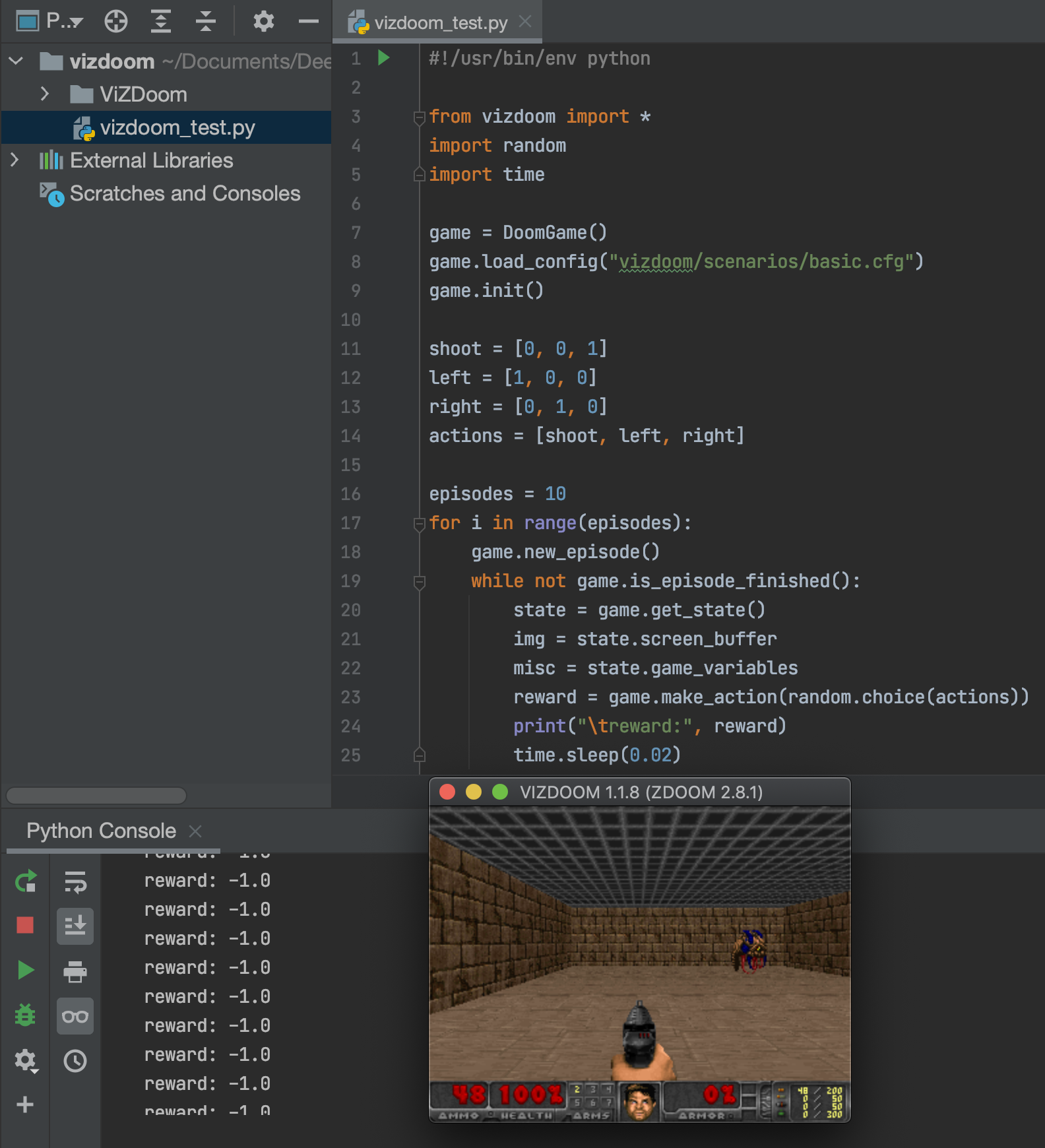
문제없이 잘 돌아간다.